
Buoyancy
Buoyancy is an upward force exerted by a fluid that opposes the weight of a partially or wholly immersed object. The BP_FluxBuoyancyComponent calculates physical forces based on the configuration set using a PDA_FluxBuoyancyData data asset. Additionally, the system supports drag and current forces that use fluid velocity to determine movement.
Multiple buoyancy components can share the same data asset. The data asset can also be switched dynamically when needed – for example, a destroyed ship that is sinking can use another data asset.
Example use cases of the buoyancy system can be found in the demo actors:
BP_FluxCrate– the most straightforward actor with one pontoon.BP_FluxBoatPawn– a combination of multiple pontoons attached to the static mesh.BP_DemoCharacter– ragdoll is made of pontoons attached to a skeletal mesh.
Implementation
To make an actor float, it needs a buoyancy component that applies the forces, a data component that reads the water height and velocity under the actor, and a data asset that describes the shape of the floating body as a set of pontoons. The steps below connect these elements; once they are in place, the actor reacts to the water automatically – it floats, drifts with the current and slows down in water.
- Add
BP_FluxBuoyancyComponentto the actor. - Add
BP_FluxDataComponentto the actor – this will be responsible for reading water height. - Create a new DataAsset that will store buoyancy settings. You can copy one of the examples (
DA_BuoyancyBoat,DA_BuoyancyCrate,DA_BuoyancyRagdoll) or create a new one: Content Browser → right-click → Miscellaneous →DataAsset->PDA_FluxBuoyancyData. - Set the newly created data asset in your actor component:
BP_FluxBuoyancyComponent.DataAsset. - Set ComponentTag = “
FluxBuoyancyOwner” in the actor component (mesh) that should be used as a parent of Buoyancy transformations.
The actor is now configured, but you must edit FluxBuoyancyData and adjust the parameters. You can do it with the help of the EUW_FluxBuoyancyEditor tool described below.
Buoyancy Editor
FluxBuoyancyEditor is an Editor Utility Tool created to preview and edit buoyancy settings in a 3D viewport.
Open the folder /Game/FluidFlux/Editor/Widgets/ in the Content Browser.
Right-click the editor utility
EUW_FluxBuoyancyEditorand choose Run Editor Utility Widget.Select the actor class with a configured buoyancy system, for example, the boat.
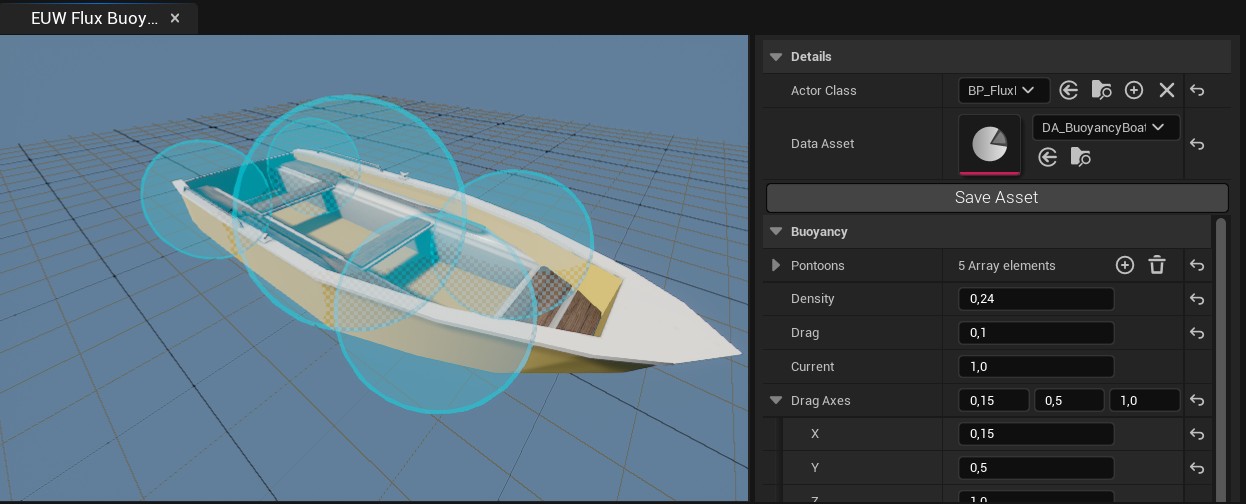
Now you can edit the data asset settings in the right panel. When work is done, click Save Asset.
Editor controls
- Left mouse button – select a pontoon (shows its settings)
- No selection – shows global parameters
- Right mouse button drag – camera rotation
- Mouse scroll – camera distance change
The buoyancy geometry is represented as a list of spherical pontoons that approximate the body’s shape. Every pontoon has parameters that should be customized for specific use cases:
| Parameter | Description |
|---|---|
| Socket | Name of bone or socket used for attaching the pontoon. |
| Radius | The radius of the pontoon sphere. |
| Offset | Offset relative to the Socket or parent component. |
| DensityWeight | Scale of the density (larger density means a heavier, less buoyant object). |
| DragWeight | The scale of the drag effect (how fluid movement pushes the pontoon). |
You can run the game and edit buoyancy settings at runtime – the changes are applied immediately.
Troubleshooting
This section describes typical problems users may encounter when working with the buoyancy system, together with explanations and possible solutions.
- If the boat is flipping, lower the Z location of the center of mass so it behaves stably.
- Try to fit the pontoons to the mesh geometry. It is more precise when detecting water and behaves more predictably.
- Adjust the side drag to stop boats from sliding sideways.
- Use
FluxBuoyancyEditorwhile the game is running to tune the settings live. - Make sure the physical body has the Tag set to
FluxBuoyancyOwner. - Use the DrawDebug option to visualize pontoons at runtime.
- In the
BP_FluxBuoyancyComponent, UsePontoonsInFluxData forces Flux data to generate custom readback points for every pontoon; it is precise but may also be slow in case of many pontoons. - The buoyancy forces require a physical body, which means it can’t be used in Sequencer, which does not simulate rigid body physics in the editor.
- Only spherical pontoons are supported, and this approximation is not precise, especially for hard-edged meshes.
- The system requires
FluxDataComponentto read the surface height and velocity weight.