
Reading fluid data
Fluid Flux uses Niagara asynchronous readback events to retrieve data from fluid render targets and pass it to blueprints. This feature is used in multiple situations:
- buoyancy and floating objects
- automatic dam breaking
- interaction detection
- swimming system
- fluid sound source analyzer
- underwater camera detection
- spawning splashes
The following demo actors present the functionality of FluxDataComponent:
- Demo/Environment/
BP_FluxDataReadbackExample– Basic data component test: reading water information and rendering an arrow of direction on the surface of water. - Demo/Environment/
BP_FluxRotatorActor– Rotating wheel reading the data from water under the mesh. - Demo/Environment/
BP_FluxBoatPawn– Advanced use case that reads multiple readback locations automatically sent by the buoyancy component. As a result, it generates water samples at all locations.
The current water state at the readback location is read from the GPU and stored in component attributes:
- Flux Surface Location – The location on the water surface.
- Flux Fluid Velocity – Velocity of water on the surface.
- Flux Fluid Height – Height of the water relative to the ground. It may be incorrect in the open ocean, where the ground height map does not exist.
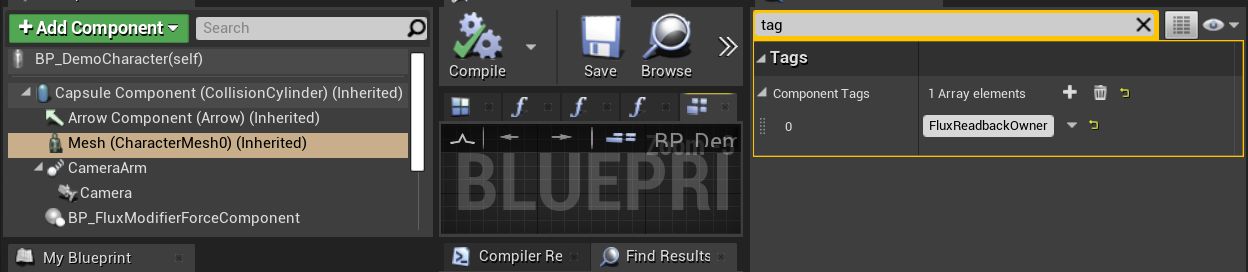
The BP_FluxDataComponent listener samples water at a specific location (Readback Locations) relative to the owner component specified by OwnerComponentTag and OwnerSocketName in the case of skeletal meshes.
By default, the component reads data from the fluid in every frame; however, for optimization, it can be configured to refresh with a lower frequency using the ReadbackEventInterval parameter.
Users can also bind to the event dispatcher OnReceiveParticleData to get the event every time the system receives data from Niagara.
OnReceiveParticleData is called only when CallOnReceiveEvent = true. The attributes of the component are updated in both cases.
Use the Debug option in FluxDataComponent to make sure that the component follows your actor and samples the correct values.
Sampling location
The component samples water relative to the owner component – the first component of the actor with the tag defined in OwnerComponentTag (default FluxReadbackOwner). When no component has this tag, the root component of the actor is used. OwnerSocketName attaches the sampling point to a bone or socket of this component.
ReadbackLocations is a list of points relative to the owner component:
- One point – the component attributes store the result for this point.
- Multiple points – the component attributes store the average of all points, and the results of single points can be read using the GetReadbackIndexedPosition function. The buoyancy component uses this mode to sample every pontoon (UsePontoonsInFluxData).
Readback frequency
| ReadbackEventInterval | Behavior |
|---|---|
| 0 | Data is read in every frame. |
| More than 0 | Data is read with the given interval in seconds. |
ReadbackEventIntervalRandom adds a random value (from 0 to the given value) to the interval. It is chosen when the readback starts and helps spread the readback of many actors (for example, floating debris) over different frames.
Surface actor
The component reads data from a single surface actor. When FindWorldSurface = true, it automatically finds the surface actor whose volume overlaps the owner actor or the sampling location; if none does, the first surface actor on the level is used. If your level contains multiple surface actors, you can set the surface by hand at runtime using the SetSurfaceActor function.
Attributes
| Attribute | Description |
|---|---|
| ReadbackLocations | Sampling points relative to the owner component. |
| ReadbackEventInterval | Interval of the readback in seconds. 0 – every frame. |
| ReadbackEventIntervalRandom | Random value added to the interval. |
| CustomReadbackSystem | Custom Niagara system used for the readback instead of the default NS_FluxDataReadbackLoop / NS_FluxDataReadbackEvent. |
| FindWorldSurface | Finds the surface actor automatically at the beginning of play. |
| UseGroundMap | Uses the ground map of the surface when sampling. |
| UseSDF | Uses the SDF mask of the surface when sampling (glass and holes cut in the surface). |
| UseWave | Uses ocean waves when sampling. |
| OwnerComponentTag | Tag of the component used as the parent of sampling points (default FluxReadbackOwner). |
| OwnerSocketName | Bone or socket of the owner component used as the parent of sampling points. |
| DrawDebug | Draws the sampled height and velocity. |
| CallOnReceiveEvent | Calls OnReceiveParticleData every time data is received. |
| Replicates | Sends the readback results from clients to the server (see below). |
| Use CPU (Experimental) | Replaces the GPU readback with a simple line trace against WorldDynamic objects. It does not read the fluid simulation – the height is always 0 and the velocity is zero. |
Multiplayer
Niagara readback does not run on dedicated servers, so the data is read by clients. When Replicates = true, the results are sent to the server:
- Autonomous proxy (for example, a possessed pawn) – the data is sent directly by the component. The owner actor must replicate.
- Simulated proxy (for example, a boat that is not possessed) – the data is sent through the player controller, which must implement the
BPI_FluxReplicationOwnerinterface (ServerReceiveReadData).
Read more about the limitations in Multiplayer.