
Interactions
The BP_FluxInteractionCapture is designed to add efficient, detailed interaction simulations in small areas around the camera (or specified object).
- It is a great addition that can improve the look of baked simulation for almost no cost.
- It currently supports the most straightforward fast ripple solver, but plans are in place to simulate a fluid pressure solver in the future.
The interaction system configuration is demonstrated in several example blueprints within the Fluid Flux demo, including BP_DemoCharacter, BP_FluxBoat, and BP_FluxCrate.
Setting up interactions
A detailed explanation of the implementation presented in BP_DemoCharacter can be found below:
Component.BP_FluxDataComponent– This component reads the fluid data required for further interaction calculations, including height and velocity. You can find more information about this component and its configuration in the Reading fluid data section.Component.BP_FluxInteractionComponent– This component stores a list of interaction sources. The interaction source is a sphere attached to the component (or skeletal mesh bone) that generates waves after interacting with fluid.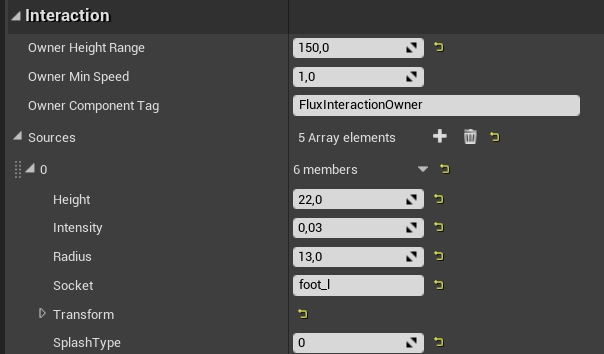
Configuration of interaction surface attached to l_foot bone. The system uses owner skeletal component with the tag “
FluxInteractionOwner”.Attach interaction sources to the mesh (skeletal or static) with the tag specified in the OwnerComponentTag attribute. Hence, adding this tag (
FluxInteractionOwner) to the skeletal mesh that will move the interaction sources is essential.
The
BPI_FluxInteractioninterface handles communication between the actor and the interaction capture system. It should be added to the Class Settings of the actor that will interact.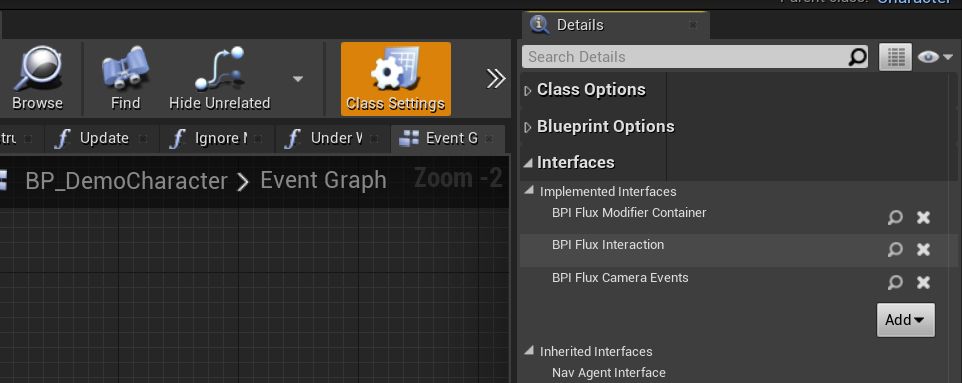
Player character interfaces
Implement the GetInteractions in
BPI_FluxInteraction. WhenBP_FluxInteractionCaptureoverlaps an interactive actor, it calls the GetInteractions function to retrieve information about the interactions that are occurring.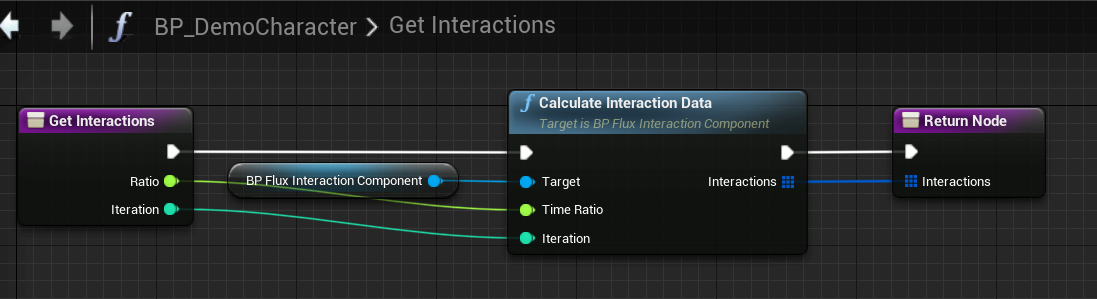
Simple implementation of the GetInteractions function from the
BPI_FluxInteractioninterface.The
BP_FluxInteractionCaptureactor is placed on every map. The actor detects the interactable actors and manages the whole process of generating the interaction effect. The InteractionCapture actor uses the overlap to identify actors within the interaction actor’s area. This mechanism ensures that only the area’s actors are considered potential sources of interaction. For example, a character uses the Capsule component for overlap; custom actors require the addition of a collision component, such as SphereCollision.
Interactions require several steps to work. If something does not work, check every part of your implementation:
- Test it on the demo maps first.
- Enable DrawDebug in
BP_FluxInteractionCapture - Enable DebugDraw in
BP_FluxDataComponent - Enable DebugDraw in
BP_FluxInteractionComponent - Make sure that “GetInteractions” is evaluated. Put a breakpoint in this function to check. If it is not, your actor is not detected by the InteractionCapture overlap, and you may need to add a collision volume to your actor.
Splashes
Interactions with a fluid surface can generate splashes, adding realism and immersion to the simulation. This is achieved through a straightforward mechanism that detects when the interaction source intersects the fluid surface. If this condition is met, the system creates a splash effect to simulate the disturbance caused by the interaction.
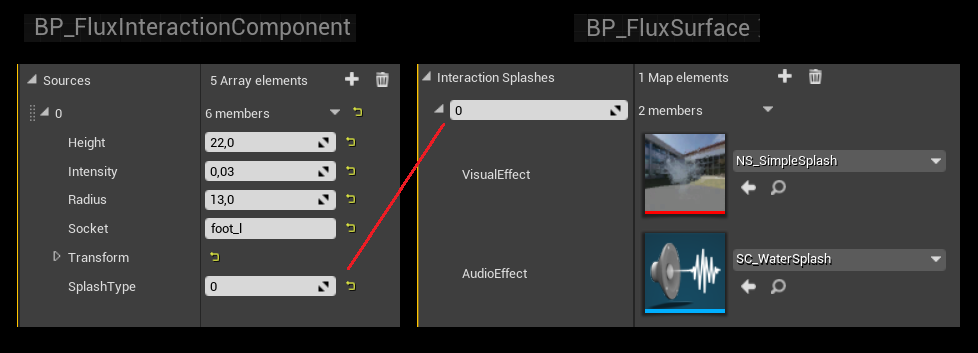
Communication between interaction component and surface actor.
The InteractionComponent->Source->SplashType defines the splash index stored in the Surface->InteractionSplashes array.