
Niagara integration
The Niagara integration is based on three elements:
BP_FluxNiagaraActorcommunicates with the simulation and sends data to the Niagara system.The NE_FluxData emitter should be inherited by the Niagara system to read the data.
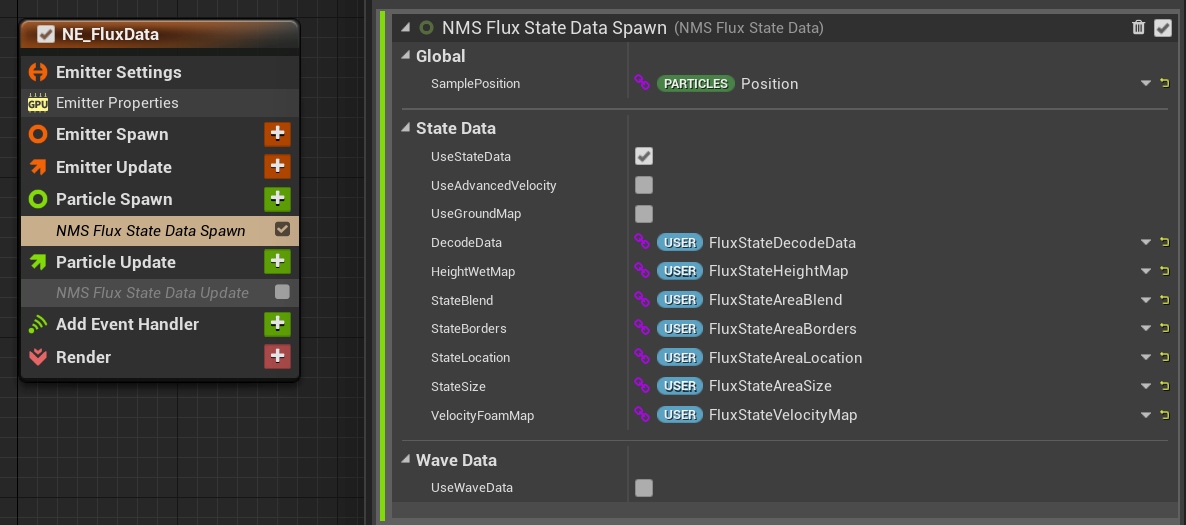
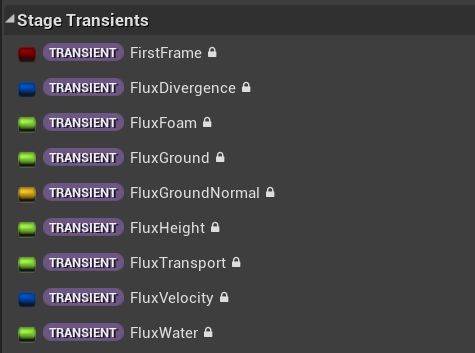
NMS_FluxStateData is a specialized module that extracts simulation data from Stage Transients variables to drive the particles.
All particle systems (trash, plants, splashes) in the pack are constructed similarly; feel free to check and modify the examples.
How it works
BP_FluxNiagaraActor spawns its Niagara system in a box volume (VolumeSize). When the actor is created, it finds the surface actor that overlaps the volume (or the first surface on the level) and passes the surface data to the Niagara system: simulation state, coastline state, ocean waves and the SDF mask.
The NMS_FluxStateData module samples this data at the particle position and writes the result to transient variables, which can be used by the following modules of the emitter:
| Transient variable | Description |
|---|---|
Transient.FluxHeight | Height of the water surface. |
Transient.FluxVelocity | Velocity of the fluid. |
Transient.FluxFoam | Foam on the surface. |
Transient.FluxGround | Height of the ground. |
Transient.FluxGroundNormal | Normal of the ground. |
Transient.FluxDistanceField | Distance read from the SDF mask. |
Transient.FluxDivergence | Divergence of the fluid velocity. |
Creating a custom particle system
- Duplicate
Environment/Niagara/Default/NS_FluxDefault. It is a minimal template that already reads the fluid data and moves the particles on the water surface.
Alternatively, create a new Niagara system with an emitter that inherits NE_FluxData. - Add your modules after NMS_FluxStateData and use the transient variables listed above to drive the particles.
- Keep the SpawnRate and SpawnSize user parameters –
BP_FluxNiagaraActoruses them to control spawning. - Add
BP_FluxNiagaraActorto the level, in an area covered by the water surface. - Set NiagaraSystem to your new system and adjust VolumeSize and SpawnRate.
- If the particles do not react to the water after changing the configuration, click RestartNiagara.
Attributes
| Attribute | Description |
|---|---|
| VolumeSize | Size of the box in which particles are spawned. It is also used to find the surface actor. |
| SpawnRate | Value of the SpawnRate user parameter. |
| NiagaraSystem | The Niagara system spawned by the actor (default NS_FluxDefault). |
| ReceiveEventFrequency | Interval (in seconds) of the readback events sent to OnWaterEvent. 0 disables the events. |
| DelayedInitialization | Delay of the initialization at the beginning of play: less than 0 – immediately, 0 – in the next frame, more than 0 – delay in seconds. Useful when the surface is not ready at the start. |
| UseGroundMap, UseWaveMap, UseSDF | Defines which surface data is sent to the Niagara system: ground map, ocean waves and SDF mask. Disable the data your system does not need. |
| CastShadow | Particles cast shadows. |
| TranslucentSortPriority | Sort priority of translucent particles (default -100). |
Interaction
The actor can send the location of a single interacting actor to the particles, for example to push plants or scare fish away from the player. Examples: NS_FluxDuckweed, NS_FluxFishes, NS_FluxFloatingMeshes and NS_FluxPlantBending in the Demo folder.
| Attribute | Description |
|---|---|
| UseInteraction | Enables the interaction. |
| InteractionClass | Class of actors detected by the volume (default Pawn). |
| InteractionActor | The actor currently interacting with the particles. It is set automatically when an actor of InteractionClass enters the volume. |
While an interacting actor is inside the volume, its location is sent every frame to the FluxInteractionLocation user parameter.
Bounds
| Attribute | Description |
|---|---|
| Infinite Extent (Unbound) | Disables culling of the particle system. |
| BoundsOffset | Offset of the fixed bounds. |
| BoundsExtent | Extent added to the volume size to compute the fixed bounds. |
Water events
BP_FluxNiagaraActor can send data from particles back to blueprints using the OnWaterEvent event dispatcher. Each event contains Position, Water and Velocity of a single exported particle.
- Set ReceiveEventFrequency to a value larger than 0.
- The Niagara system must expose the
ReadbackHandler(Export Particle Data),ReadbackFrequencyandReadbackEventsuser parameters and export particles to the handler. The NMS_FluxExportData module used byNS_FluxDataReadbackEventis an example of this setup. - Bind to OnWaterEvent in the level blueprint or in another actor.
NS_FluxDefault and the demo particle systems do not export events. The readback starts only during play, after the first ReceiveEventFrequency period.